Mockup Licenses Explained: Personal vs Commercial Use
Mockup license commercial use explained: personal vs commercial, attribution, freemium and paid licenses, and what to check before client work.
By Mockova Team5 min read
You find the perfect free mockup, use it in a client presentation, and the client loves it so much they want it on their product page. Then you notice a small line on the download page: personal use only. Now what?
Licences are the least exciting part of using mockups, and the one most likely to cause a real problem. The good news is that most of them fall into a handful of types, and you can learn to read them in a few minutes.
Quick answer: A mockup license says where you can use the finished images. “Personal use” usually means your own non-commercial projects and portfolio. “Commercial use” covers client work and business use, sometimes including product listings and ads. Always read the creator’s license, check whether attribution is required, and keep a copy of the license with the file.
A quick note: this guide explains common license terms in general. It isn’t legal advice, and every creator writes their own terms. When a project matters, read the actual license or ask the creator.
What a mockup license actually covers
When you download a mockup, you don’t own it. You get permission to use it in certain ways. The license sets those limits, usually around three questions:
- Who is the project for? Yourself, a client, or a product you sell.
- Where will the image appear? A portfolio, a presentation, a website, a shop listing or printed material.
- What can’t you do? Usually: resell or share the mockup file itself, even if you change it.
That last point is nearly universal. You can use the images you create with a mockup within the license terms. You can’t redistribute the mockup file, whether it’s free or paid.
Personal use vs commercial use
These two terms cause most of the confusion.
Personal use generally means projects that don’t make money: practice, school work, your own portfolio, a hobby page. Many free mockups allow only this. Some creators also count “showing work in your portfolio” as personal, even if the design was for a client. Others don’t. Check.
Commercial use means the image is used for business: client presentations, a company website, social posts for a brand, ads or product listings. If someone is paying for the work, or the image helps sell something, assume it’s commercial.
If a mockup is personal use only, it’s great for testing ideas and learning. Before it goes into anything a client will use, switch to a mockup with a commercial license, or buy the commercial version if the creator offers one.
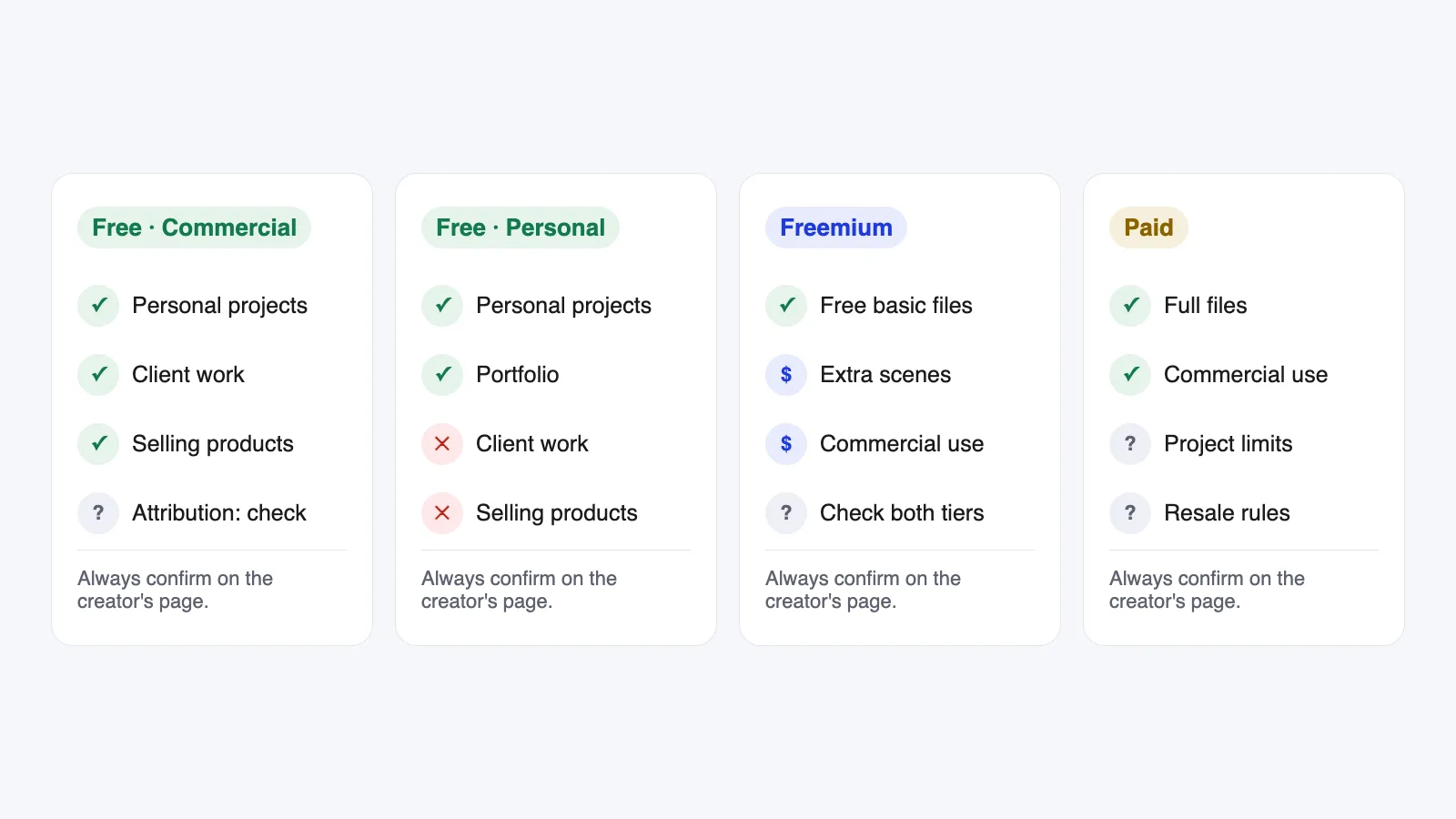
The four license types you’ll see most
Free, commercial use allowed. The best case for client work. You can usually use the images in personal and commercial projects. Many still ask for credit, and some exclude certain uses like templates for resale, so read the details.
Free, personal use only. Fine for practice and often for your portfolio. Not for client deliverables, ads or product listings.
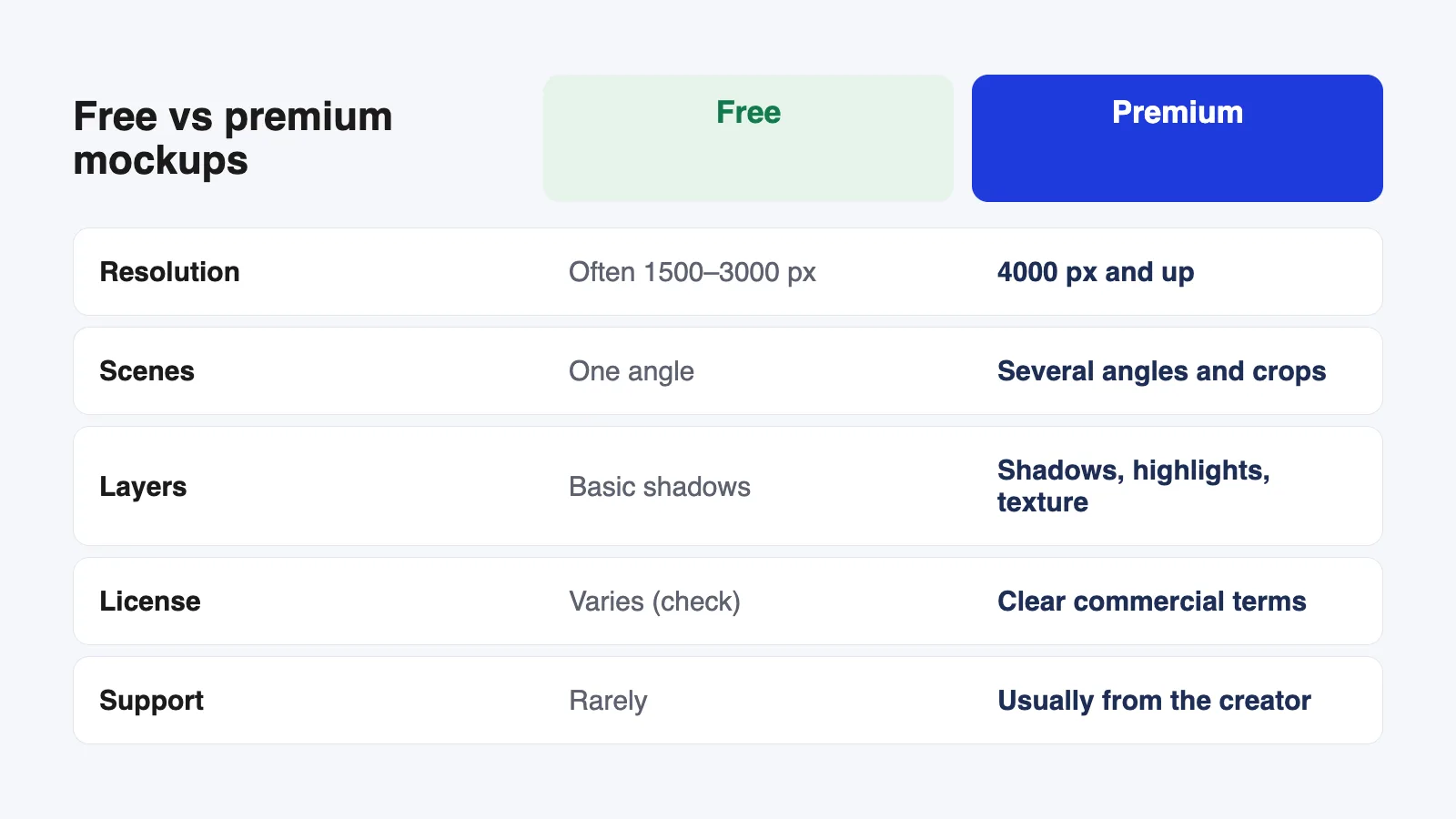
Freemium. A free version with limits (fewer scenes, lower resolution or personal use only), plus a paid version that unlocks the rest. Read both licenses. Upgrading usually changes what you’re allowed to do, not only what you get in the file.
Paid (premium). You buy a license, usually covering commercial use. Some paid licenses limit the number of projects, the number of people using the file, or use in items you sell. Bigger marketplaces often offer a standard and an extended license for exactly this reason.
Attribution: when you have to give credit
Some licenses, especially for free mockups, require you to credit the creator, often with a link. Where and how varies: in a portfolio caption, in the description of a post, or on the page where the image appears.
If credit is required and you can’t add it, for example on a client’s product page, look for a different mockup or a paid license that removes the requirement. When attribution is optional, it’s still a kind thing to do on your own portfolio.
Can I use mockups in product listings and ads?
This is where licenses differ most, so it deserves its own section.
Using a mockup as the main photo for something you sell, like a t-shirt on Etsy or a mug on Shopify, is a commercial use. Some free licenses allow it. Many don’t, or only allow it with a paid license. Print-on-demand sellers should look specifically for wording that mentions product listings, merchandise or e-commerce.
Ads are similar. A mockup in a paid social ad is clearly commercial, and a few licenses exclude advertising altogether.
When the license doesn’t mention your exact use, don’t guess. Ask the creator. Most are happy to answer and an email reply is a usefull record.
A simple habit that saves trouble later
Every time you download a mockup for a real project:
- Save the license next to the file: a PDF, a screenshot or the text in a note.
- Write down where you got it, including the creator and the page link.
- Note any credit you owe, and add it when you publish.
It takes a minute and it means you can answer the question “are we allowed to use this?” six months later without searching.
FAQ
Can I use a free mockup for a client project?
Only if the license allows commercial use. Many free mockups do; many are personal use only. Check the license on the creator’s own page, not a re-upload on another site.
Do I need to credit the creator?
If the license requires it, yes. If it’s optional, credit is still appreciated on portfolio pieces. For client work where credit isn’t possible, choose a mockup that doesn’t require it.
Can I edit a mockup and sell it as my own?
No. Changing the colors, background or layers doesn’t give you the right to sell or share the mockup file. You can sell products or services that use the images you make, within the license terms.
What happens if I use a mockup outside its license?
The creator can ask you to take the images down, and in some cases ask for payment. It’s much easier to check before you publish than to fix it afterwards.
Your next step
Look at the mockups you’re using right now and check one thing for each: does the license match the project? If you’re still choosing, our guide to choosing the right mockup includes the license check in a quick list you can run before every download.